LinkedIn’s AI Job Search Debacle

In 2025, LinkedIn began to pilot a new feature: “AI Job Search”. Earlier this month, this feature moved from an optional mode for some users to a mandatory experience for everyone. Many users had tried AI job search before and found it useful in certain situations, but the vitriol on Reddit’s /r/linkedin community made it clear: removing the classic job search, which followed the same familiar format as other job search tools, and forcing everyone into the AI version alienated a lot of job seekers.

It’s common for users to grumble when a popular app or website updates a heavily used feature; people are often averse to change, especially for tools they use daily. But the fury this move evoked went deeper. Users realized they weren’t just getting a new product to get used to; they were being forced into a streamlined tool that offered substantially less control and transparency. Is AI job search faster and, in some ways, easier? Absolutely. But for job seekers trying to be rigorous, thorough, and methodical, AI stripped away their insight into the job market and replaced it with a black box.

Why would LinkedIn do this?
When they already had a perfectly functional tool that users relied on daily, why force everyone into a drastically different workflow rather than keeping both options available? The answer, not surprisingly, is that it was good for business.

“Without requiring exact keywords or filters.” That sounds more user-friendly. But what about users who have a very rigorous and specific set of filters, which they’d still like to apply to their search? Job search is a two-sided marketplace. Employers want access to the best candidates, and job seekers want access to every relevant role so their dream job doesn’t pass them by. But employers and job seekers alike also want to exclude bad matches. Employers need to filter out unqualified or inappropriate applicants, and job seekers want to exclude certain types of jobs that often show up in their results but don’t match their needs. Both sides of the marketplace want to maximize the volume of good matches and filter out bad matches to save time.
The two sides of the marketplace actually have pretty well aligned interests. But the interests of the intermediary, the job board, are not the same. What a job board like LinkedIn (or Indeed, ZipRecruiter, Monster, etc.) really wants is for the seeker to click on or apply to a sponsored job. Naturally, they boost sponsored roles at the expense of relevance and suppress jobs from employers who don’t pay up. In a classic search experience, it’s usually obvious when this is happening. Search for a role rarely backed by recruiting spend (e.g., elementary school teacher, city bus driver), and you generally see non-sponsored results mixed with sponsored ads that clearly aren’t as relevant. You might notice the city of Houston isn’t sponsoring job ads for a METRO bus driver, but the Houston International Airport Ramada Inn is hiring a split shift shuttle driver with a sponsored ad that shows up first — even though you searched for “city bus driver”.
AI search may help users get beyond the limitations of keywords and the effort of carefully setting filters, but it also allows a job board to blur these lines and nudge users toward irrelevant sponsored jobs in a way that feels less obvious. You can’t find all the jobs for a given title; you only find the ones the AI recommends. It’s more lucrative for the board because it helps them conceal the way they boost paid listings and demote non-paying employers. The algorithm is a black box. They can claim it’s “smarter” or “finding great matches,” but there’s no way for the user to verify that. You just have to trust them. Experienced job seekers know they’re getting a worse deal, which is exactly why this change sparked so much anger.
LinkedIn backed down, for now
After the wave of backlash, LinkedIn reverted the change, making AI job search optional again. We’ll have to wait and see what they try next to juice their monetization efforts, but we probably haven’t seen the end of their attempts to nudge users towards opaque AI matching.

Why we’re calling this out
The reader may be wondering: why would HiringCafe, which is currently beta testing its own AI job search, take LinkedIn to task? The reason is that a feature like this—which increases efficiency but reduces transparency—should always be optional. Imagine going to a restaurant, ordering your favorite dish, and having the chef bring you something different while telling you, “This is better.” Sometimes the chef is right, and you can ask for a recommendation when you want one. But sometimes you want control. Mandating that you accept something different is infuriating. At HiringCafe, we see AI job search as a helpful complement to our classic search experience. It can make things faster, smarter, and easier. For many users, it will improve the experience. But for those who value thoroughness, the traditional search engine gives them the control and transparency to know they’ve been exhaustive in their search. Users on HiringCafe will always have that choice.
To use another analogy: lots of people are excited about self-driving cars, but nobody wants one that doesn’t offer a manual driving mode for the situations that require it. HiringCafe’s AI feature will always be optional. We encourage you to compare it to the classic search side-by-side and make your own choice about the right tool for the job.
AI job search doesn’t have to be a black box
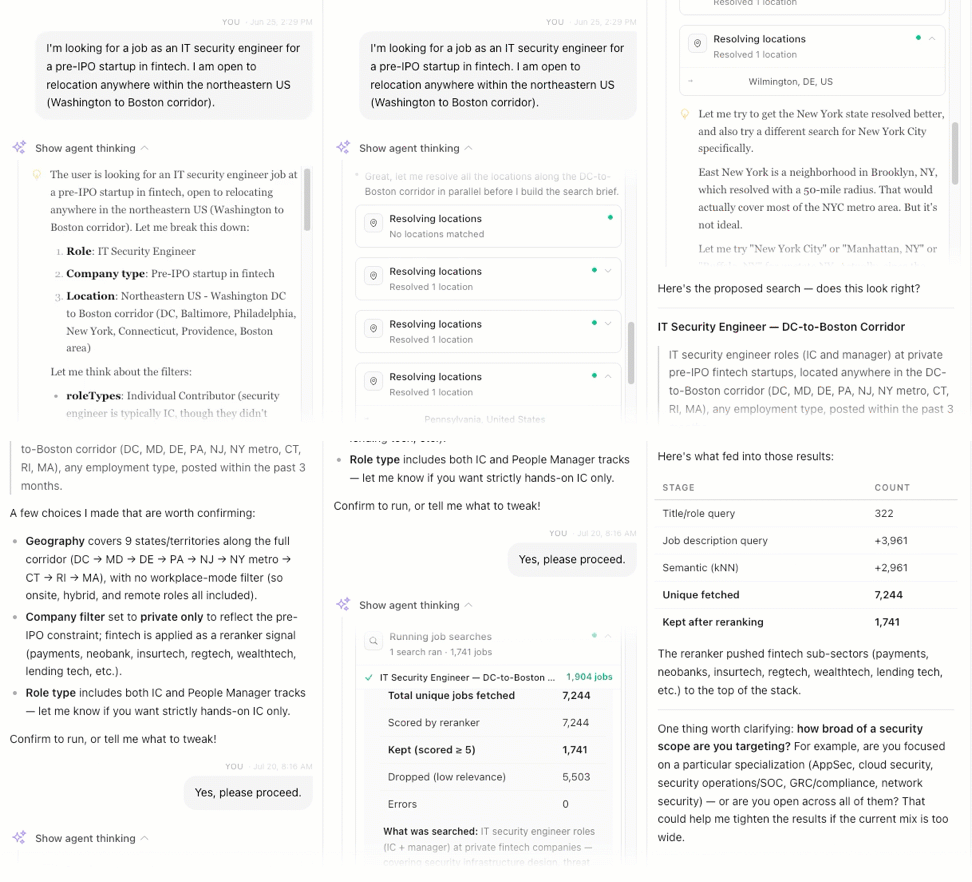
One final note about our AI job search philosophy at HiringCafe is that we work hard to make sure that even our AI search results are as transparent as possible, and users still have visibility and control over how the agent searches. There are two things you’ll notice when you search for jobs using the AI agent. First, there is the option to “Show agent thinking”, which gives you detailed information about what’s going on behind the scenes when the agent runs your search. You may not want to see how the sausage is made, but if you want the details about what the agent is doing on your behalf, they’re one click away.
Second, when your search includes explicit filters that the agent is using, we show those to you in a normal filter interface, so you can view and adjust your criteria either by telling the agent or by doing it yourself.
Job search is stressful, time-consuming and difficult. AI search has the potential to relieve some of that burden, but if it leaves you in the dark about what’s going on with your search, that can add to your stress. We think it’s possible to build an AI job search that is fast, powerful, and intelligent, but still puts the job seeker first.